Free cookie consent management tool by TermsFeed
Skip to main content

Enhanced driving behavior insights for safe food delivery

Manage auto liability risk by coaching and correcting driver behavior in real-time for safer operations.

See how it works:

Connect your vehicles to
real-time fleet management
Reduce
risk & collisions
Protect your operation
The right package choices for you

Solutions for operators

Our solutions cater to operator-owned or leased vehicles used on behalf of your business. Choose from one of three fleet management packages designed to help reduce risky driving and improve team member and public safety.
These are allowable FCR expenses.
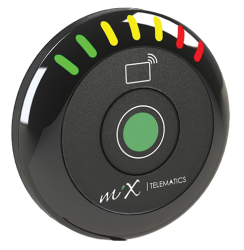
Real-time, in-vehicle driver feedback is provided by the digital in-cab coach, while optional road cameras offer further protection from false claims.
Optional in-cab cameras counteract fatigue and distraction pre-emptively, to prevent collisions.
Tamper-proof, on-site professional installations are provided with every package.

Choose from 3 packages

Package one
$22
  • MiX Drive Mate
  • Road Facing Camera
  • In-Cab Driver Protection Camera
Package two
$41
  • MiX Drive Mate
  • Road Facing Camera
  • In-Cab Driver Protection Camera
Package three
$44
  • MiX Drive Mate
  • Road Facing Camera
  • In-Cab Driver Protection Camera

Chick-fil-A operator testimonial

Adriana Ramirez-Bustamante
Franchise Owner at Huebner & Babcock in San Antonio, TX

Do you feel the MiX Telematics cameras have helped enhance operations and improved team member safety?
Yes, definitely. This is another important tool for our delivery platform.
Do you feel that the MiX Telematics cameras protect the drivers?
Yes, especially when there is an incident that requires footage or evidence of the issue.
Would you recommend that vehicles are on the road without cameras?
No, the cameras are part of our safety procedures.

Frequently asked questions

Common Questions:
How do I...
How do I get a login for the MiX Fleet Manager System?
Send email to This email address is being protected from spambots. You need JavaScript enabled to view it. or you'll receive a setup email from This email address is being protected from spambots. You need JavaScript enabled to view it.. Username will mimic your email address; each user can create a unique password which must be done on a laptop or PC
How do I arrange training for myself and my team on the MiX Fleet Manager System?
Training will be set up with your Customer Success Manager after installation has been completed.
How do I give my drivers access to the MyMiX App?
This topic will be covered in the training session.
How do I retrieve a forgotten password?
Click on the "Forgot password" at login screen us.mixtelematics.com.

Details:
What are the contract and warranty details?
What is the length of the warranty?
Warranty is upheld based of length of the contract and renewal.
Do I own the MiX hardware/equipment?
No, MiX Telematics maintains ownership of the hardware.
What will it cost to add more vehicles to my contract?
$44.00, $41.00 or $22.00 based on these selected package.
When does my contract renew?
36-months after contract commencement (signed) date.
What do I do at the end of my contract?
For contract renewal nothing, cancellation 30-day notice.

Financial:
What are the financial details?
How do I pay my invoices?
Invoice shall be emailed unless CC on file.
What do I do if I have a question about finance-related issues?
Please send an email to This email address is being protected from spambots. You need JavaScript enabled to view it. or contact your Customer Services Manager

Removal:
De-installs and removal of hardware
What do I do if my vehicle has been sold or written off??
We have a Client Care team that deal with all the de-/re-installs of equipment in vehicles. Should you need help with this, please send an email to the following address: This email address is being protected from spambots. You need JavaScript enabled to view it. The Client Care team will send you a form to complete wherein you will need to specify all relevant vehicle details. Once the form has been fully completed and sent back to the Client Care team, they will confirm all the costs associated with the process. After this, an arrangement will be made with our engineers to visit your premises to carry out the de- or re-install. They will confirm all time scales with you. Should you feel the need to escalate any queries, this can be done by contacting your assigned MiX Sales Manager.
How do I arrange to swap over the MiX equipment from one vehicle to another?
We have a Client Care team that deal with all the de-/re-installs of equipment in vehicles. Should you need help with this, please send an email to the following address: This email address is being protected from spambots. You need JavaScript enabled to view it.. The Client Care team will send you a form to complete wherein you will need to specify all relevant vehicle details. Once the form has been fully completed and sent back to the Client Care team, they will confirm all the costs associated with the process. After this, an arrangement will be made with our engineers to visit your premises to carry out the de- or re-install. They will confirm all time scales with you. Should you feel the need to escalate any queries, this can be done by contacting your assigned MiX Sales Manager.
What does it cost to swap over the MiX equipment from one vehicle to another?
We have a Client Care team that deal with all the de-/re-installs of equipment in vehicles. Should you need help with this, please send an email to the following address: This email address is being protected from spambots. You need JavaScript enabled to view it. The Client Care team will send you a form to complete wherein you will need to specify all relevant vehicle details. Once the form has been fully completed and sent back to the Client Care team, they will confirm all the costs associated with the process. After this, an arrangement will be made with our engineers to visit your premises to carry out the de- or re-install. They will confirm all time scales with you. Should you feel the need to escalate any queries, this can be done by contacting your assigned MiX Sales Manager.
How long will it take to swap over the MiX equipment from one vehicle to another?
We have a Client Care team that deal with all the de-/re-installs of equipment in vehicles. Should you need help with this, please send an email to the following address: This email address is being protected from spambots. You need JavaScript enabled to view it. The Client Care team will send you a form to complete wherein you will need to specify all relevant vehicle details. Once the form has been fully completed and sent back to the Client Care team, they will confirm all the costs associated with the process. After this, an arrangement will be made with our engineers to visit your premises to carry out the de- or re-install. They will confirm all time scales with you. Should you feel the need to escalate any queries, this can be done by contacting your assigned MiX Sales Manager.
I have signed my service schedule, what's next?

If the vehicle list has NOT been provided you will need to send us a vehicle list. The information needed will be Make, Model, Year and VIN if available (Template available upon request). MiX Telematics will reach out to the store contact to get this information as needed. Behind the scenes MiX is creating your account, once completed the primary email address associated to your store's location will receive an email from This email address is being protected from spambots. You need JavaScript enabled to view it. please click this link to set up your password and active your account. If the store would like additional users “Team Members” to have access to your MiX FM account, please submit an email to This email address is being protected from spambots. You need JavaScript enabled to view it. with the users first name, last name and email address.

A 15 min kickoff meeting will be set up by your account manager to complete the following items:

  • Discuss rollout plan, training program, MiX Learning Center and any unanswered questions.
  • Confirmation of solution being installed on the vehicles.
  • Confirmation of vehicle availability and any special request.

Agree upon installation date, time frame, and window will be determined.

Training videos

How to review historical tracking on the mobile app How to review historical tracking on the mobile app
How to select events using the Mobile App